
How to Quote & Order Castellated Hole PCB
If your project requires Castellated Hole PCB, you can enable it during the online quote process. This page explains where to find the Castellated Hole PCB option, how to change it from No to Yes, and how to continue the quote after selecting the required board layers.
Quick Summary
- Open the PCB online quote page.
- Select the required PCB Layers first.
- Go to Unusual PCB Features (Option).
- Find Castellated Hole PCB.
- Change it from No (Default) to Yes.
- Continue the quote process with the special PCB option enabled.
Step 1: Open the PCB Online Quote Page
Start from our PCB online quote page:
This is where you begin entering the PCB requirements before moving to pricing.
Step 2: Select the PCB Layers First
Before enabling the castellated hole option, please select the required PCB Layers. This should be done first in the quote setup.
Step 3: Open “Unusual PCB Features (Option)”
After choosing the PCB layers, go to the Unusual PCB Features (Option) section.
This section contains special feature options that are not part of the normal basic PCB setup.
Step 4: Change Castellated Hole PCB from “No” to “Yes”
In the Unusual PCB Features (Option) section, find the field labeled Castellated Hole PCB.
The default value is No (Default). Please change it to Yes.
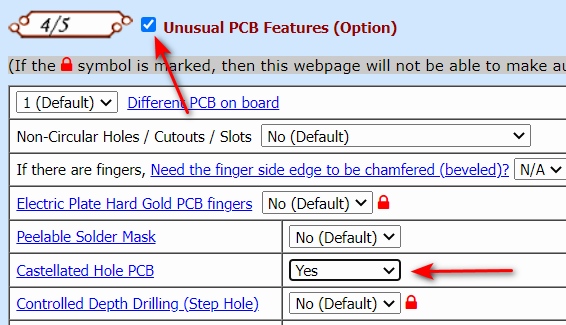
Step 5: Continue the Quote Process
After enabling Castellated Hole PCB, continue filling in the remaining PCB specifications and proceed with the quote process.
What Does Castellated Hole PCB Mean in the Quote Form?
In the quote form, Castellated Hole PCB refers to a special PCB feature option. If your PCB design requires castellated holes at the board edge, you should enable this option during the quote process so the requirement is included in the order review.
If your project does not require castellated holes, leave the option at the default setting.
Castellated Hole PCB Quote Process Summary
| Stage | What to Do |
|---|---|
| Quote setup | Open the PCB online quote page |
| Layer selection | Select the required PCB Layers |
| Special feature section | Go to Unusual PCB Features (Option) |
| Castellated hole option | Change Castellated Hole PCB from No to Yes |
| Continue quote | Proceed with the remaining PCB quote steps |
When Should You Enable Castellated Hole PCB?
You should enable this option when your PCB design specifically requires castellated holes as part of the board-edge structure or module connection requirement.
If your engineering drawing or Gerber design includes castellated holes, this option should be set to Yes.
Need Help?
If you are not sure whether your PCB design requires castellated holes, please contact us before placing the quote or order.