
How to Quote High Temperature PCB
If your project requires high temperature PCB material, you can select it during the online quote process. This page explains where to find the material selection menu, how to choose a high temperature PCB material after selecting PCB layers, and how to continue your quote.
Quick Summary
- Open the PCB online quote page.
- Select the required PCB Layers first.
- Open the PCB Material dropdown menu.
- Select the high temperature PCB material that matches your requirement.
- Continue the quote process with the selected material.
Step 1: Open the PCB Online Quote Page
Start from our PCB online quote page:
This is where you begin the PCB specification setup before moving to pricing.
Step 2: Select the PCB Layers First
Before choosing the material, please select the required PCB Layers. The material dropdown is part of the PCB information section and should be chosen after the layer selection is made.
Step 3: Open the PCB Material Dropdown Menu
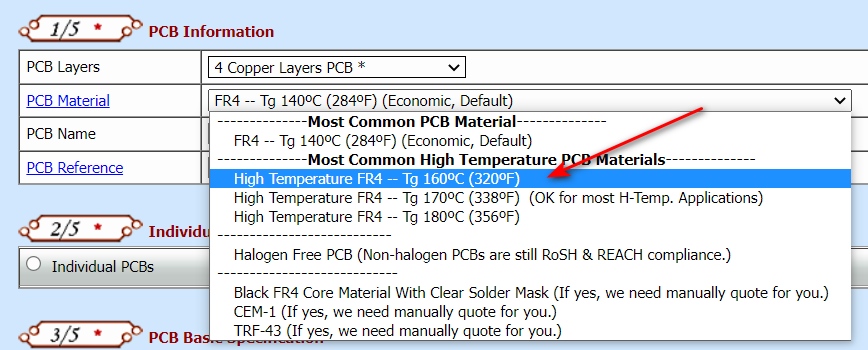
After selecting the PCB layers, find the PCB Material field. Click the dropdown menu on the right side to view the available material options.
Step 4: Choose the High Temperature PCB Material You Need
In the PCB Material dropdown menu, select the high temperature material that matches your project requirement.
As shown in the material list, available options may include:
- High Temperature FR4 -- Tg 160°C (320°F)
- High Temperature FR4 -- Tg 170°C (338°F)
- High Temperature FR4 -- Tg 180°C (356°F)
Step 5: Continue the Quote Process
After selecting the required high temperature PCB material, continue filling in the remaining PCB specifications and proceed with the normal quote process.
High Temperature PCB Quote Process Summary
| Stage | What to Do |
|---|---|
| Quote setup | Open the PCB online quote page |
| Layer selection | Select the required PCB Layers |
| Material selection | Open the PCB Material dropdown menu |
| High temperature option | Select the high temperature PCB material you need |
| Continue quote | Proceed with the remaining PCB quote steps |
Common High Temperature Material Options
The PCB material menu may include several high temperature FR4 options with different Tg values. These options are intended for projects that require stronger temperature performance than standard PCB material.
If you are not sure which material to choose, please confirm the requirement with your design engineer or project specification before placing the order.
Need Help?
If you are not sure which high temperature PCB material is suitable for your order, please contact us before placing the quote or order.