
How to Request REACH Certification for Your PCB Quote
If you need REACH certification for your PCB order, you can request it during the online quote process. This page explains where to find the REACH Certification option, how to change it from No to Yes, how to confirm the quotation includes REACH Certification: Yes, and when the REACH certificate will be sent to you.
Quick Summary
- Open the PCB online quote page.
- Expand Unusual PCB Features (Option).
- Change REACH Certification from No to Yes.
- Continue the quote process.
- Check the final quotation Specification and confirm it shows REACH Certification: Yes.
- After the PCB order is completed and shipped, the REACH certificate will be sent to the customer by email.
Step 1: Open the PCB Online Quote Page
Start from our PCB online quote page:
During the quote setup, locate the area for unusual or special PCB requirements.
Step 2: Expand “Unusual PCB Features (Option)”
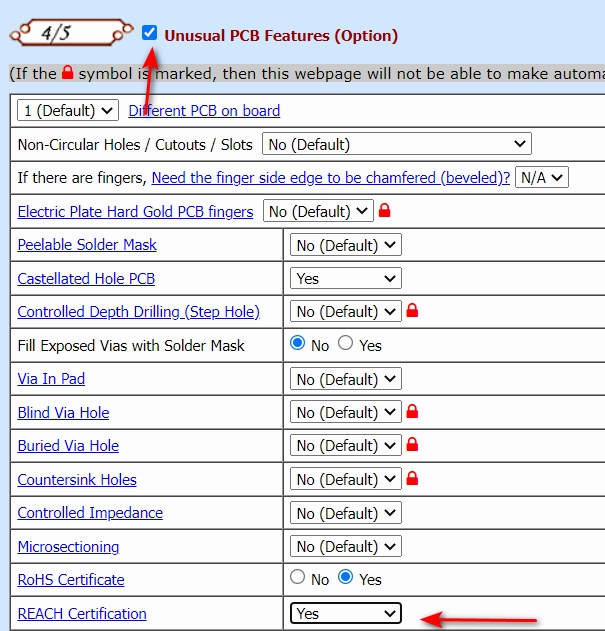
In the quote page, expand the Unusual PCB Features (Option) section. This will display additional selectable requirements, including the REACH Certification option.
Step 3: Change REACH Certification from “No” to “Yes”
In the expanded area, find the REACH Certification option. The default value is No. Please change it to Yes.
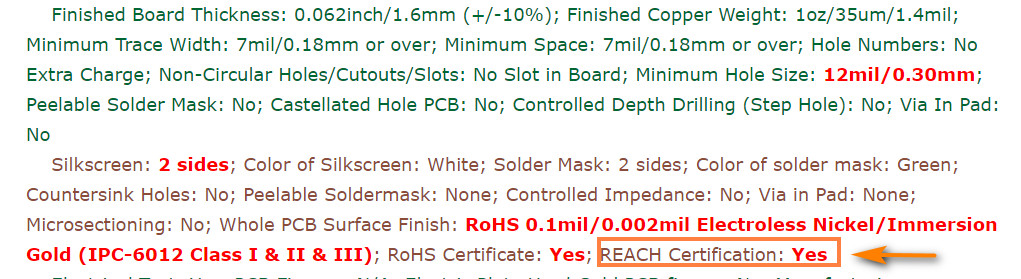
Step 4: Confirm the Quotation Shows “REACH Certification: Yes”
After continuing the quote process, please review the generated quotation carefully.
If you selected Yes, the final Specification should clearly show:
This is the key confirmation point before you move forward with the order.
When Will I Receive the REACH Certificate?
If you selected REACH Certification = Yes in the online quote form, and the quotation specification shows REACH Certification: Yes, then after the PCB order is completed and the shipment has been dispatched, our company will send the REACH certificate by email to the customer.
REACH Request Process Summary
| Stage | What to Do |
|---|---|
| Quote setup | Expand Unusual PCB Features (Option) |
| REACH option | Change REACH Certification from No to Yes |
| Quote confirmation | Check the final Specification and confirm it shows REACH Certification: Yes |
| After shipment | The REACH certificate will be sent to the customer by email |
Need More Information About REACH?
If you want to understand the basic meaning of REACH certification before requesting it, please read our explanation page.
Related Topic
If your order also needs RoHS-related compliance documentation, please see our related guide.
Need Help?
If you are unsure whether your PCB order requires REACH certification, or if you want to confirm the requirement before placing the order, please contact us.