
How to Select PCB Surface Finish
If your project requires a specific PCB Surface Finish, you can select it during the online quote process. This page explains both where to choose the Surface Finish in the quote form and how to decide which finish is more suitable for your PCB application.
Quick Summary
- Open the PCB online quote page.
- Select the required PCB Layers first.
- Go to the PCB Basic Specification section.
- Open the Surface Finish dropdown menu.
- Select the Surface Finish option that matches your requirement.
- Continue the quote process with the selected finish.
How to Choose the Right PCB Surface Finish
Selecting PCB Surface Finish is not only a form operation. It is also an engineering decision. The correct finish should be based on the actual assembly and application requirement.
- Assembly Method: through-hole, standard SMT, fine-pitch SMT, BGA, or CSP
- Pad Flatness Requirement: some fine-pitch parts need flatter pads than HASL can provide
- Reliability Target: storage condition, handling control, and assembly requirement matter
- Contact Wear Requirement: edge contacts and gold fingers usually need Hard Gold
- Wire-Bond Requirement: some bonding applications may require ENEPIG
- Compliance Requirement: lead-free or RoHS requirement may affect your finish choice
- Cost Target: the best finish is the one that fits the job, not simply the most expensive one
Step 1: Open the PCB Online Quote Page
Start from our PCB online quote page:
This is where you begin entering the PCB specification before moving to pricing.
Step 2: Select the PCB Layers First
Before choosing the Surface Finish, please select the required PCB Layers. The Surface Finish option appears in the PCB specification area after the basic board setup begins.
Step 3: Find “Surface Finish” in PCB Basic Specification
After selecting the PCB layers, go to the PCB Basic Specification section. In that area, find the field labeled Surface Finish.
This is where you select the finish process that matches your PCB requirement.
Step 4: Open the Surface Finish Dropdown Menu and Choose the Required Option
Click the dropdown menu on the right side of Surface Finish and choose the option that best matches your project requirement.
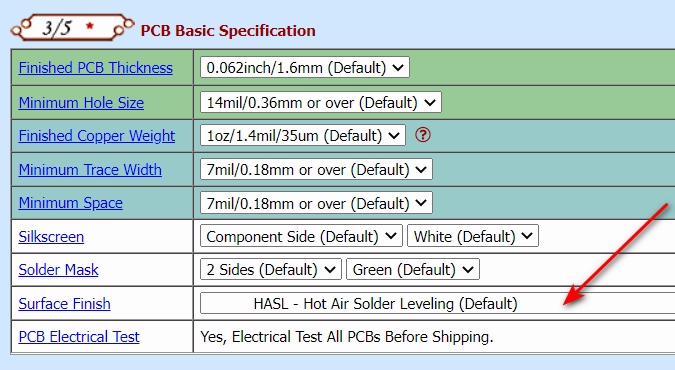
Step 5: Continue the Quote Process
After selecting the required Surface Finish, continue filling in the remaining PCB specifications and proceed with the normal quote process.
Common PCB Surface Finish Options
The Surface Finish dropdown menu may include options such as:
- HASL - Hot Air Solder Leveling
- RoHS Lead Free HASL
- RoHS Electroless Nickel / Immersion Gold (ENIG)
- ENEPIG (if available for the project)
- RoHS Immersion Silver
- Immersion Tin (if available for the project)
- RoHS OSP - Organic Solderability Preservatives
- Hard Gold for edge contacts or special wear surfaces
Please choose the option that matches your design, assembly, reliability, compliance, and contact-use requirement.
Best Surface Finish by Application
The following table is a practical selection guide for common engineering situations.
| Application or Requirement | Recommended Finish |
|---|---|
| General low-cost PCB project | HASL or Lead Free HASL |
| Fine-pitch SMT, 0.4 mm BGA, CSP, flat pad requirement | ENIG or ENEPIG |
| RF / high-frequency / controlled impedance projects | ENIG or Immersion Silver |
| Wire-bond requirement | ENEPIG |
| Edge fingers, card edge contacts, repeated insertion wear | Hard Gold |
| Cost-sensitive SMT project with flat pad preference | OSP |
| Fine-pitch SMT in suitable controlled process | Immersion Tin |
Quick Surface Finish Recommendation Table
| If You Need | Usually Consider | Reason |
|---|---|---|
| Lower cost general PCB | HASL / Lead Free HASL | Widely used and economical for general applications |
| Flatter SMT pads | ENIG / OSP / Immersion Silver / Immersion Tin | These finishes are flatter than HASL in general use |
| Fine-pitch BGA or CSP | ENIG / ENEPIG | Better flatness and advanced assembly compatibility |
| Wire-bond compatibility | ENEPIG | Suitable for advanced bonding-related applications |
| Wear-resistant contact pads | Hard Gold | Better for repeated contact and insertion wear |
| RF signal related project | ENIG / Immersion Silver | Commonly considered for flat surface and suitable electrical performance |
PCB Surface Finish Selection Summary
| Stage | What to Do |
|---|---|
| Quote setup | Open the PCB online quote page |
| Layer selection | Select the required PCB Layers |
| Specification section | Go to PCB Basic Specification |
| Finish selection | Open the Surface Finish dropdown menu |
| Engineering check | Confirm the finish matches assembly, reliability, and compliance requirement |
| Continue quote | Proceed with the remaining PCB quote steps |
Need Help?
If you are not sure which PCB Surface Finish is suitable for your order, please contact us before placing the quote or order.